Chapter 9 · Communications
Emergency alerts on your phone, and texting when networks are busy
The loud, strange tone on every phone in the room is a Wireless Emergency Alert, and it is the fastest warning most households will get. Here is how the system works, what each alert type means, which settings to check, and how to reach family when the network is jammed.
Read first: Household plan
Almost every household already owns an emergency alert receiver: the phone in someone's pocket. When a tornado warning, flash flood warning or evacuation order goes out for your area, a compatible phone sounds a tone no ordinary text can make and shows a short message. You don't sign up for it and you don't pay for it.
The same phone becomes much less reliable a few minutes later, when everyone tries to call everyone else. This page covers both halves: how the alerts reach you and which settings to check, and how to get messages through when the network is busy.
How an alert gets to your phone
Wireless Emergency Alerts (WEA) are short emergency messages that authorized officials send to compatible phones in a targeted area. The FCC says the WARN Act set up WEA in 2008, it went live in 2012, and it has since been used nearly 96,000 times. It is a partnership among FEMA, the FCC and the wireless companies, and carriers take part voluntarily; all the major ones do.
The path runs like this (see Fig. 9-4):
- An alerting authority writes the message. That can be the National Weather Service, a state or local emergency manager, police, the National Center for Missing and Exploited Children, FEMA's Administrator or the President. FEMA says more than 2,000 federal, state, local, tribal and territorial authorities use its system.
- FEMA's IPAWS checks and routes it. The Integrated Public Alert and Warning System, set up in 2006, authenticates the message and sends it down several paths at once: WEA to phones, the Emergency Alert System to radio and TV, NOAA Weather Radio, and local systems such as sirens and digital road signs. FEMA says the content and timing of an alert are up to the alerting authority; FEMA doesn't review, edit, approve or disapprove alerts that public safety agencies send.
- Your carrier broadcasts it from the cell towers covering the target area, mainly by cell broadcast, FEMA says. That is a different technology from a text message, which is why an alert can get through when texts and calls are stuck.
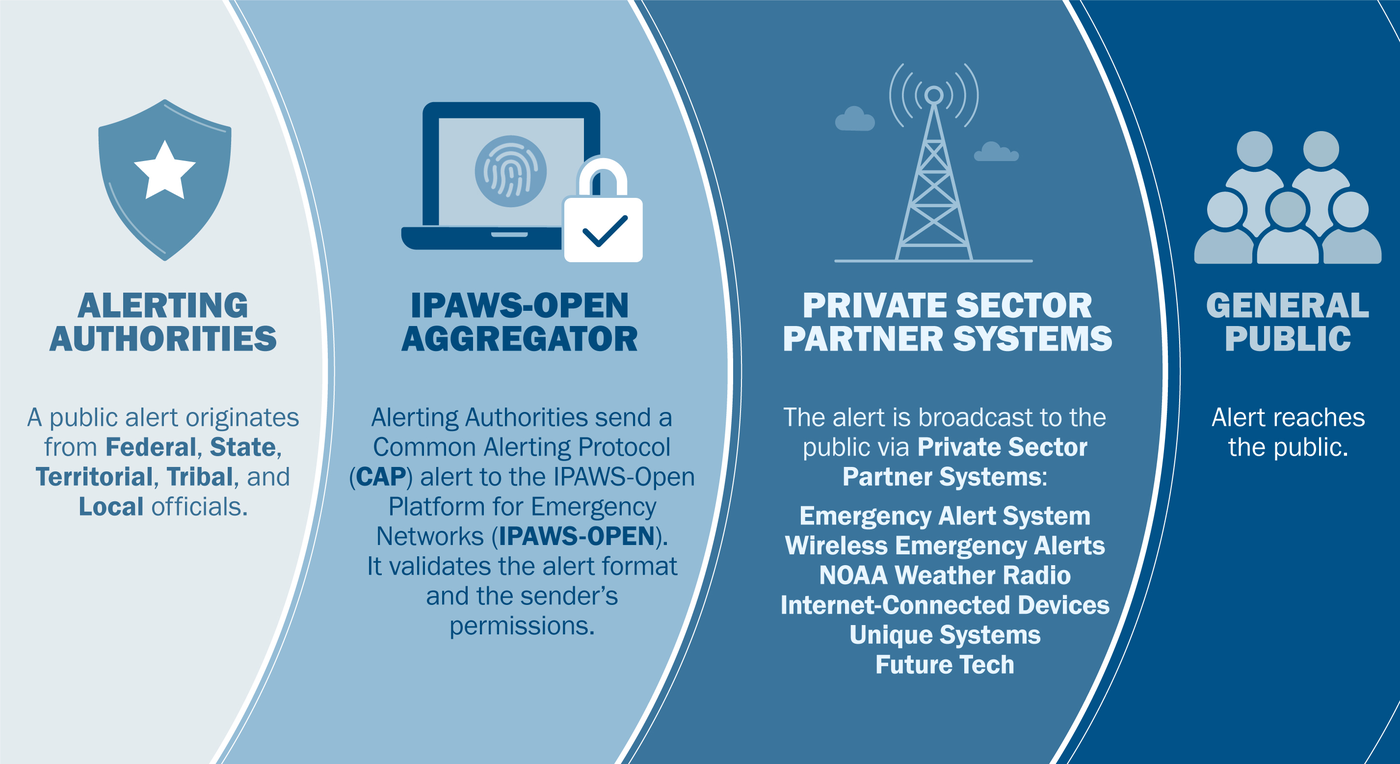
FEMA, Integrated Public Alert and Warning System infographic. Public domain; cropped. Not endorsed by FEMA.
Because it is broadcast to an area, every compatible phone in range receives it, including visitors and roaming phones. WEA doesn't track your location. If you drive into an area where an alert is still active, your phone should receive it when you arrive.
The alert types
| Alert type | What it's for | Can you turn it off? |
|---|---|---|
| National Alert (formerly Presidential) | A national emergency; issued by the President, the President's designee or FEMA's Administrator | No. Phones must always show it |
| Imminent Threat Alert | A threat to life or property that is extreme or severe, needs action now or within the hour, and is observed or likely, such as dangerous weather or an order to evacuate | Yes, carriers may offer an opt-out |
| AMBER Alert | A child abduction meeting the Justice Department's criteria; four kinds, from family abduction to endangered runaway | Yes |
| Public Safety Message | Advice that can save lives or property, sent only alongside one of the alerts above; less severe than an Imminent Threat | Yes |
| State/Local WEA Test | Tests by state and local officials; the message says it's a test | Off unless you opt in |
The categories and the opt-out rules are from the FCC's WEA rules (47 CFR 10.280, 10.350 and 10.400), FEMA and the FCC's consumer guide. Congress, in the WARN Act, let carriers offer a way to block every type except National Alerts.
One exception to "tests are opt-in": the rules allow up to two public awareness tests per county per year that reach phones by default, provided officials announce them in advance and say in the message, where they can, that it is only a test.
Which weather warnings go to phones
Not every National Weather Service warning becomes a WEA. NWS sends only its most urgent ones:
- Tsunami, Tornado, Hurricane, Typhoon, Storm Surge, Extreme Wind, Dust Storm and Snow Squall Warnings
- Severe Thunderstorm Warnings only when the damage threat is "destructive"
- Flash Flood Warnings only when the damage threat is "considerable" or "catastrophic"
So a phone alert is a strong signal to act, but its absence doesn't mean all is well. Watches and lower-level warnings reach you through a NOAA Weather Radio, local media and weather apps. NWS advises following any action the alert gives and checking TV, radio, NOAA Weather Radio or another trusted source for details.
What an alert looks and sounds like
The FCC's rules fix the sound so that it can't be mistaken for anything else. A WEA-capable phone plays one long tone of two seconds and two short tones of one second each, with half-second gaps, and repeats the whole pattern twice. On phones that can play two tones at once, the signal combines two pitches, 853 Hz and 960 Hz; phones that can play only one use 960 Hz. The vibration follows the same long-short-short pattern. The FCC notes this helps people with hearing or vision disabilities. Using the tone outside a real alert, an authorized test or an official public service announcement is against the rules.
The message itself:
- Carries five parts: what the event is, the area affected, the recommended action, when it expires, and who sent it. (National Alerts are exempt from that list.)
- Is short. Up to 360 characters on newer phones and networks. Senders must also supply a 90-character version for older phones, which is all an older 3G phone shows, NWS says.
- May be in Spanish as well as English; the language you see depends on your phone and its settings.
- May contain a link or phone number. FEMA asks officials to put the key information in the text itself, so read the message even if the link won't load.
- Stays on the phone. Newer phones keep alerts for at least 24 hours or until you delete them, so you can reread one.
- Waits for your call to end. A phone may not let an alert interrupt a call in progress; FEMA says the alert is delayed until the call ends.
How precise the area is
Since December 2019 carriers must deliver an alert to the whole target area drawn by officials with no more than a tenth of a mile (528 feet) of overshoot, on phones that support it. That capability relies on newer phones; the FCC cites a wireless industry estimate that about 83 percent of smartphones supported it in 2023. Older WEA phones still receive alerts, but for a rougher area, so you may get an alert that doesn't quite apply to your street. Treat it as meant for you until you've checked.
Older sources disagree
FEMA's Know Your Alerts and Warnings sheet (FEMA P-1093, July 2018) describes WEA as free 90-character messages in three categories: Presidential, AMBER and Imminent Threat. That was right when it was printed. FEMA's current WEA page and the FCC's rules describe the 2019 changes: 360 characters, Spanish-language alerts, and the added Public Safety Message and opt-in test categories. Rely on the newer description.
Check your phone's settings
Government alerts are normally on by default. The point of checking is to make sure nobody in the house turned them off to stop the noise, and to know where the switches are.
| Phone | Where the settings are | Notes from the maker |
|---|---|---|
| iPhone | Settings > Notifications, scroll to the bottom, Government Alerts | Turn each alert type on or off; some can't be turned off. Test Alerts are U.S.-only and off by default (iOS 15.4 or later). On iOS 26.2 or later, Enhanced Safety Alerts (earthquake and imminent threat alerts that Apple delivers over Wi-Fi and cellular data) appear under Enhanced Alerts |
| Android | Settings > Notifications > Wireless emergency alerts | Turn alert types on or off and set their sound and vibration; you can also find past alerts. Some steps need Android 12 or later, and menus differ between phone makers |
What to set:
Phone alert settings for every phone in the house
- Imminent threat or "Emergency" alerts: on
- Public Safety alerts: on
- AMBER alerts: on (FEMA says they exist so the community can help find a missing child)
- Test alerts: on for at least one phone, so you know your carrier is delivering
- Older phones: ask your carrier whether they're WEA-capable; the FCC says the tightest targeting needs newer phones
- Children's phones: set up the same way; Ready.gov encourages parents to talk with children about what an alert means
If an alert doesn't arrive
FEMA lists the usual reasons a phone misses an alert: weak cell signal; being on a call; the phone off, in airplane mode or connected to a VPN; the phone not connected to a tower that's broadcasting the alert, or that tower being out of service; or the alert type switched off. Some older phones can't receive WEA at all; Ready.gov says some carriers label the setting "Government Alerts" or "Emergency Alert Messages," and that your carrier can tell you whether your phone is supported. FEMA says a phone that keeps repeating the same alert may be stuck in a loop and can be fixed by turning it off and on.
Other ways alerts reach you
A phone is one receiver. FEMA and Ready.gov describe several more, and a household should have at least two.
| Channel | How you get it | Sign-up needed? | Limits |
|---|---|---|---|
| WEA | Compatible phone | No | Only the most urgent alerts; needs a working tower |
| Emergency Alert System | Broadcast radio and TV, cable, satellite | No | You have to be listening or watching |
| NOAA Weather Radio | Weather radio receiver | No | Needs a receiver programmed for your county |
| Local opt-in alerts | Text or email from your county or city | Yes | Small text-message costs may apply, FEMA says |
| Enhanced telephone notification (such as reverse 911) | Calls to landlines, and to mobiles if you opt in | Sometimes | Check with local emergency management |
| Outdoor sirens | Heard outdoors | No | Not designed to be heard indoors; some old sirens no longer work |
| School, work and community systems | Lists, texts, emails | Usually | Only as good as your current contact details |
| FEMA app | Smartphone app | Download | NWS alerts for up to five locations |
Two of these need action now. Sign up for your county's alerts: FEMA suggests searching your town, city or county name with the word "alerts," or calling your local emergency management office. And get a NOAA Weather Radio for the bedroom, which sounds an alarm for warnings in your county.
FEMA also points to PBS WARN, a backup path for delivering WEAs if IPAWS's connection to the carriers is ever cut. FEMA says every WEA sent through IPAWS is received and displayed on the PBS WARN website.
When the network is busy: text first
In an emergency far more people try to use their phones at once, and the FCC says that surge can congest the network. FEMA's plan puts the practical answer in two words: text first. A text needs far less bandwidth than a call, and it may be stored and sent automatically once capacity returns. The FCC adds that in many cases a text will go through when a call won't, and texting leaves more room for emergency calls.
The FCC's and FEMA's other advice, in order of usefulness:
- Keep calls short. Say only what matters, to emergency workers or family. It frees the network and saves battery.
- Wait 10 seconds before redialing. The FCC explains that redialing too fast resends data before the network has cleared the last attempt, which adds to the jam.
- Try another path. If the mobile call fails, try a text or email, or a landline if you have one. Spreading demand across networks reduces congestion overall.
- Use one out-of-town contact. FEMA says a long-distance call may get through when one across town won't, because local lines jam. Everyone reports to that one person.
- Save your battery. Dim the screen, close apps you don't need, use airplane mode when you don't need the network, and skip videos and games, which also eases congestion.
- Have backup power. Charged batteries, a car charger and a solar charger. A portable power station can recharge phones through an outage.
- Keep a corded phone. The FCC says cordless phones usually won't work in a power outage; FEMA recommends a landline and analog phone, with battery backup if it's cordless.
- Forward the home line. If you evacuate and have call forwarding, forward your home number to your mobile.
- Don't text or call while driving without a hands-free device; the FCC suggests placing calls while the vehicle is stopped.
What to say in a text: FEMA's example is "I'm OK. At library." Who you are, that you're safe, where you are. Make a group list of the people you'd text in an emergency now, while there's no hurry.
Charging a phone in the car
FEMA's plan warns that if you charge a phone in your car, the car must be in a well-ventilated area, not a closed garage, to avoid carbon monoxide poisoning. Running an engine in an enclosed space can kill. See generator safety for the same hazard with generators.
Calling and texting 911
Call if you can. The FCC says a voice call gives a 911 center more information and is always the preferred way to reach 911. Text-to-911 is available only where the local 911 center has chosen to accept texts; the FCC publishes a list of those areas, updated monthly. If you text 911 where it isn't available, your carrier must send an automatic "bounce-back" message telling you to use another method, so you don't wrongly believe your text went through. People who are deaf, hard of hearing or speech disabled can use a TTY or a relay service where text isn't available.
FEMA's plan says everyone, children included, should know how and when to call 911, and to call only for a life-threatening emergency. The first five minutes covers what to do while you wait for help.
When phones don't work at all
FEMA's plan warns that mobile phones and computers may be unreliable in a disaster and that the power may be out. That is what the rest of the Communications chapter is for: a household radio plan with FRS or GMRS radios, a ham license for longer reach, and a weather radio for warnings. The long power outages page sets out what fails first.
Before the next storm
- Alert settings checked on every phone in the house
- County and city alerts signed up for, on at least two phones
- NOAA Weather Radio programmed for your county, batteries fresh
- Group text list made: household plus out-of-town contact
- "In Case of Emergency" (ICE) contact saved on every phone, as FEMA suggests
- Important numbers written on paper, in wallets and kits
- Car charger, battery pack or power station charged
- A corded landline phone, if you have a landline
- Everyone knows: text first, keep calls short, wait 10 seconds to redial
Sources
- FCC — Wireless Emergency Alerts (WEA)
- FEMA — Wireless Emergency Alerts
- FEMA — Integrated Public Alert and Warning System
- FEMA — IPAWS 101 fact sheet (January 2024)
- Ready.gov — Emergency Alerts
- Ready.gov — Know Your Alerts and Warnings (FEMA P-1093, July 2018)
- eCFR — 47 CFR Part 10, Wireless Emergency Alerts
- NWS — Weather warnings on the go (Wireless Emergency Alerts)
- FCC — Tips for Communicating in an Emergency
- FEMA — Create Your Family Emergency Communication Plan (FEMA P-1094, July 2018; copy hosted by U.S. Army Garrison Fort Riley)
- FCC — Text to 911: What You Need to Know
- Apple Support — Government, Emergency, and Enhanced Safety Alerts on iPhone
- Google Android Help — Get help during an emergency with your Android phone